A client book for nail technicians, hairdressers and other beauty professionals
If you work alone — nails, hair, lashes, brows, make-up, waxing, massage — and your clients book by message or phone, you need a place to write the appointment down, see your day, and remember who likes what. Pocket Client Book: Diary is an offline client book for iPhone and iPad that does that and stays on your device. Below is what it does for a solo beauty professional, and what it does not.
A working day
- A client writes to you. You open the calendar, see the free time inside your working hours, and tap a slot.
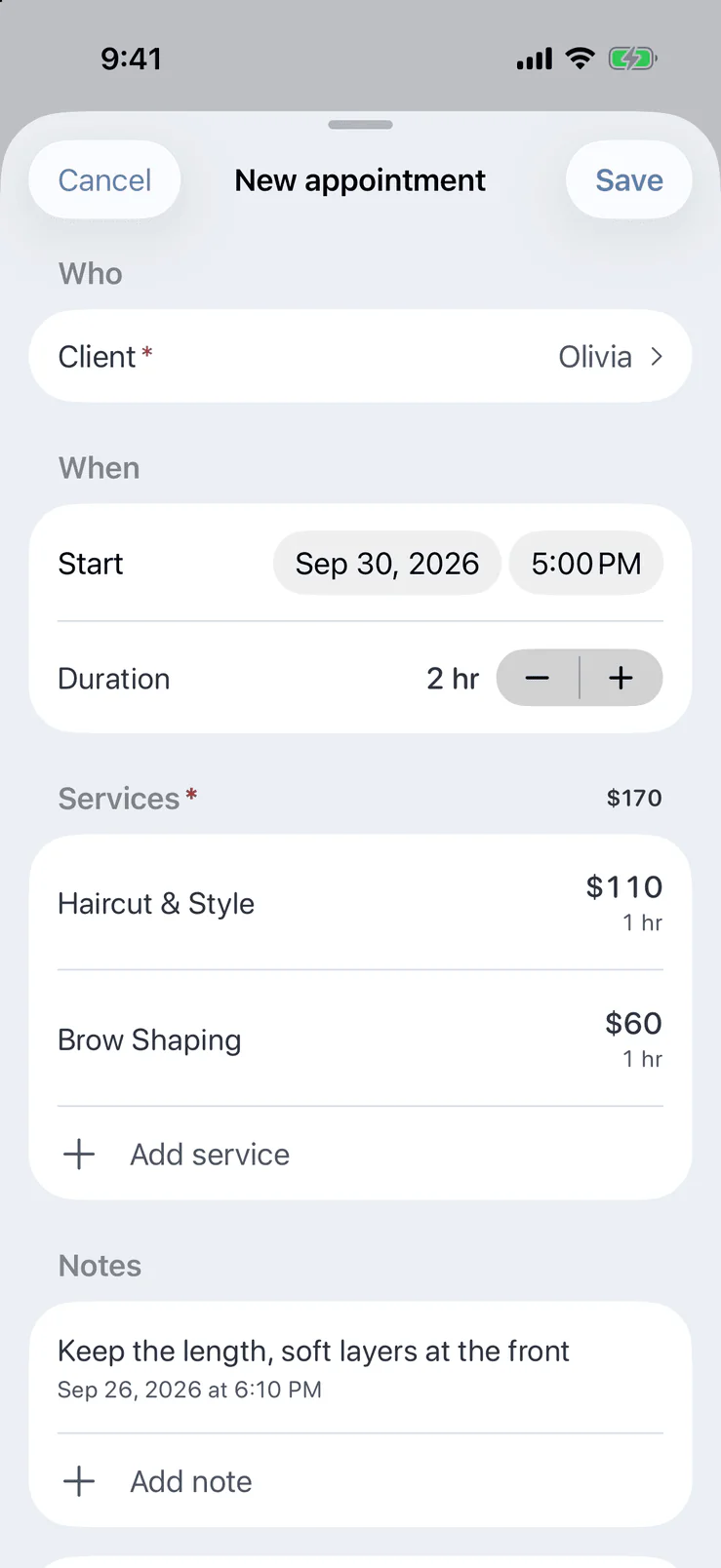
- You pick the client and add the services — for example, manicure plus design. Each service brings its own duration and price, and the visit shows the total.
- If the new booking overlaps another one, the app warns you before you save.
- Before the visit you get a notification. One tap prepares a reminder with the client's name, time and service and opens the messenger; you press send.
- After the visit you mark it completed and enter what you received, or mark a cancellation or a no-show.
Services and prices
- A service catalogue with name, duration, price and colour
- Several services in one visit, with the total counted for you
- Price and duration can be changed for a single visit without touching the catalogue
- Services you no longer offer can be archived instead of deleted
- One currency for the whole app, chosen from 25
The client card
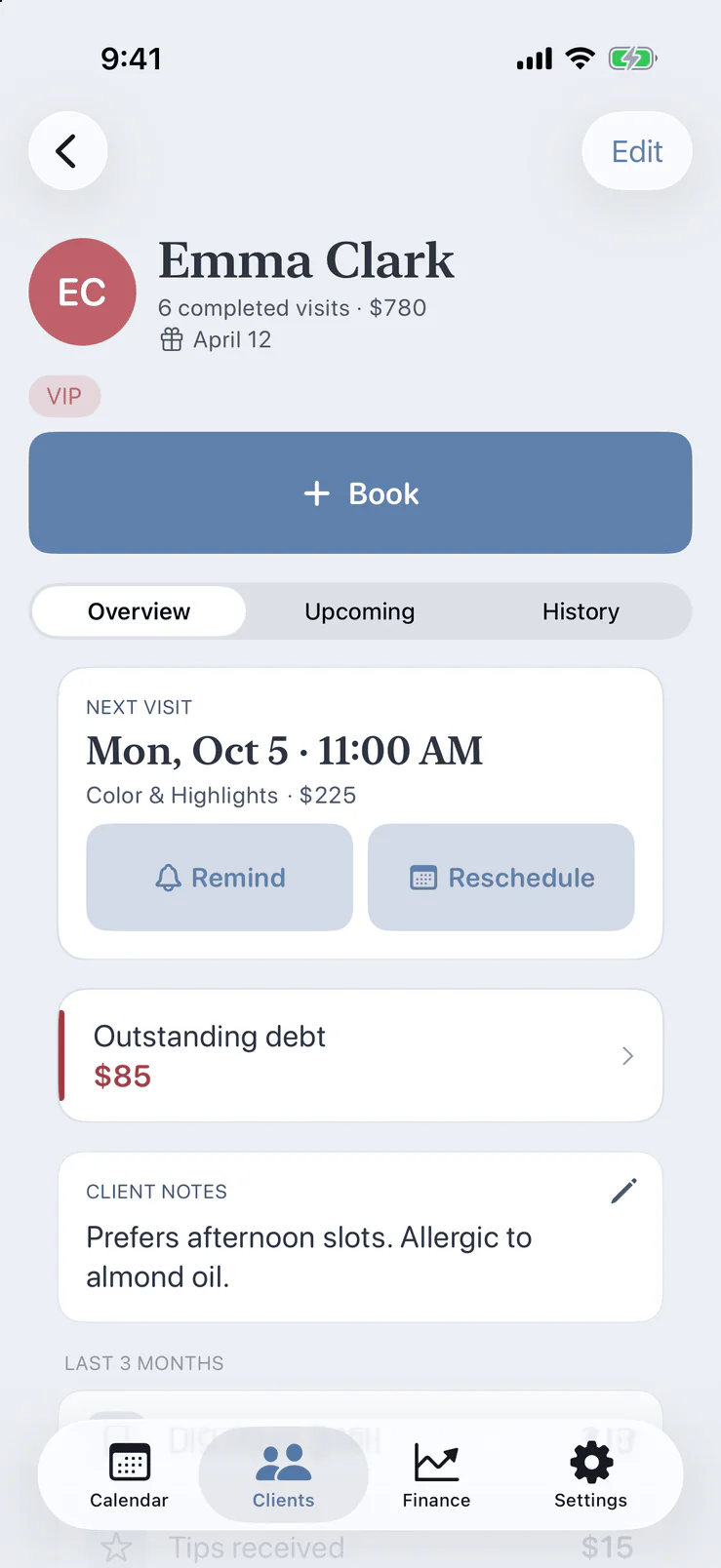
- Name, phone and birthday
- Instagram, Telegram, WhatsApp and Viber handles, so you can open the chat from the card
- Colour tags you define yourself
- A note of up to 1,000 characters — a colour formula, an allergy, a preference
- A separate note on each visit
- Visit history, the next visit and how much the client has paid
- List filters: active, dormant, with a debt, archived
No-shows and debts
Every visit has a status: booked, completed, pending payment, cancelled or no-show. If a client paid only part, the visit stays as pending payment and the amount owed is shown next to the client in the list and in the profile. The full debtors list and the finance dashboard are part of PRO.
What it does not have
So that nothing surprises you after installing:
- No online booking page — clients cannot book themselves
- No automatic messages to clients — the app prepares the text, you send it
- No client photos and no before-and-after gallery
- No stock or materials tracking
- No loyalty cards, discounts, deposits or prepayments
- No shared calendar for several staff — it is one person's diary
- No birthday reminders — the birthday is shown in the profile only
- No bulk import: clients are added by hand or one at a time from iPhone Contacts
- No Android or web version
What it costs
The calendar, clients, services, tags and one reminder per appointment are free with no time limit. PRO costs $4.99 per month with a 14-day free introductory period, $29.99 per year, or $79.99 once for PRO Lifetime; all three unlock the same features. Prices are in USD, and the App Store charges the equivalent for your region.
Common questions
- Is it really free for everyday work?
- Yes. The calendar, clients, services, tags, personal events and one reminder per appointment are free with no time limit and no cap on the number of clients or appointments. PRO adds finance, the widget, sync, backup and advanced reminders.
- Can two of us share one schedule?
- No. The app is built for one professional. PRO sync keeps your own iPhone and iPad the same through your own iCloud account; it is not a shared team calendar.
- Can I attach photos of my work to a client?
- No. The client card holds text only: contacts, tags and notes.
- How do I move my clients into the app?
- You add them by hand or pick them one at a time from iPhone Contacts. There is no bulk or file import.
- Can I block lunch or a day off?
- Yes. Personal events such as lunch or errands sit on the same calendar as client visits, working hours are set for each weekday, and Settings has schedule exceptions for specific dates.
Try it with your next client
Calendar, clients and services are free on iPhone and iPad.